What Are RAG Agents? A Plain-English Guide for Business Owners
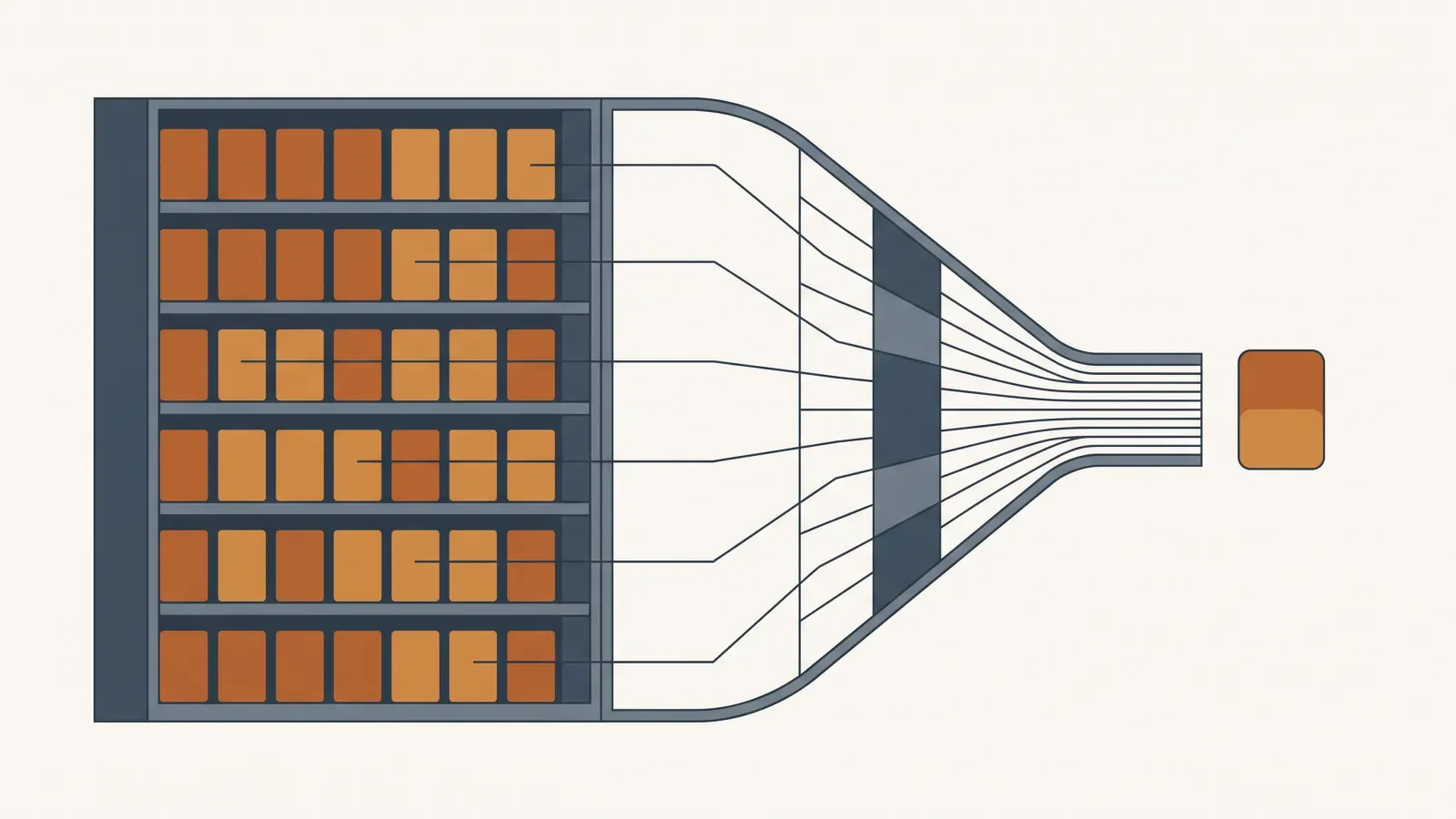
RAG agents (Retrieval-Augmented Generation) are AI assistants that search your company's own documents before they answer, then cite the source, so the answer comes from your policy or contract instead of the model's general training. This guide covers how they work in October 2026, when a per-seat tool like Copilot or Claude Team is enough, when a custom build pays off, and what each option costs.
The Challenge
Every assistant now claims to know your business. Microsoft 365 Copilot, ChatGPT Business, Claude Team, and Google Workspace each ship connectors to your files, and every AI vendor calls their product an agent. An owner comparing a $20 per seat subscription with a five-figure custom quote cannot tell what the extra money buys, or whether a 1 million token context window makes retrieval unnecessary. This guide explains the mechanics in plain language, lists verified October 2026 prices, and gives you a test for which option fits your document library.
What You Will Learn
RAG stands for Retrieval-Augmented Generation. The agent searches your documents, hands the matching passages to the model, and the model answers with a citation to the source page.
Per-seat assistants now ship connectors: Microsoft 365 Copilot at $30 per user per month, Claude Team and ChatGPT Business at $20 to $25, Google Workspace Standard at $14. Start there if your files live in those suites.
Flagship models accept about a million tokens. Under 200,000 tokens (roughly 150,000 words), paste the library into a cached prompt. Above that, retrieval wins on accuracy and on cost, because accuracy degrades as context grows.
MCP is an open connector standard, donated to the Linux Foundation's Agentic AI Foundation in December 2025 and adopted by Claude, ChatGPT, Copilot, and Gemini. One connector works across assistants.
A custom build runs 6 to 7 weeks in a typical JY Labs engagement. Running costs land under $100 per month for a small business. Data preparation and permissions drive the build cost.
Follow Along
What RAG means
RAG stands for Retrieval-Augmented Generation. A language model on its own answers from what it learned in training. A RAG agent runs a search over your documents first, hands the matching passages to the model, and the model writes an answer from those passages with a citation back to the page it used.
Three parts do the work:
- Ingestion. Someone collects your PDFs, Word files, wiki pages, tickets, and emails, splits them into passages, and indexes them. In most builds, indexing means creating embeddings (numeric fingerprints of meaning) and storing them in a vector database, plus a keyword index for exact terms like part numbers and case citations.
- Retrieval. When an employee asks a question, the system searches the index and pulls the handful of passages most likely to contain the answer.
- Generation. The model reads those passages and writes the answer, quoting the source.
The word "agent" means the model decides what to search for, runs more than one search when the first comes back thin, and calls other tools (your CRM, your ticketing system) when the answer lives there. A plain RAG pipeline searches once. An agent keeps searching until it has what it needs or reports it could not find the answer.
How a RAG agent differs from ChatGPT or Claude out of the box
In 2025 the answer was simple: ChatGPT knew the internet and a RAG agent knew your files. In October 2026 that line has moved. Claude ships connectors to Google Drive, Microsoft 365, Slack, Notion, and HubSpot on every plan, and enterprise search across company data on Team and Enterprise. ChatGPT Business supports connectors and custom MCP servers for company knowledge. Microsoft 365 Copilot reads your SharePoint and OneDrive by default.
So the question for an owner becomes who controls the four things a RAG agent gets right or wrong:
- Permissions. Does the system respect who is allowed to see which document, or does a junior hire get answers drawn from the partner-only folder?
- Retrieval quality. Does it find the right clause in a 90-page contract, or the first paragraph with a matching keyword?
- Citations. Does every answer link to the page it came from, so a human verifies in one click?
- Freshness. When you update the return policy, does the agent answer from the new version the same day?
A per-seat assistant gives you reasonable defaults on all four and no control over any of them. A custom build gives you control and the bill that comes with it. The next section prices both.
Three ways to get RAG in October 2026, with prices
Verified list prices as of this week. They move, so check before you budget.
1. A per-seat assistant with connectors. The cheapest way to find out whether your team will use this.
- Microsoft 365 Copilot: $30 per user per month paid yearly. The small-business add-on, Microsoft 365 Copilot Business, lists at $21 per user per month on an annual term, discounted to $18 through December 31, 2026 for the first year, capped at 300 users, and requires a qualifying Microsoft 365 plan.
- Claude Team: $20 per seat per month billed annually, $25 monthly, 2 to 150 seats. Connectors on every plan, enterprise search on Team and Enterprise.
- ChatGPT Business: $20 per user per month billed annually, $25 monthly, two-seat minimum, with connectors and support for custom MCP servers.
- Google Workspace: Standard at $14 per user per month includes Gemini in Gmail, Docs, Sheets, and Drive plus Gemini Notebook.
For a 20-person office, that is $280 to $600 per month. If your documents already live in Microsoft 365 or Google Drive and your questions are "what does the handbook say about PTO," start here.
2. A managed retrieval service inside a custom app. You get your own interface, your own rules, and the vendor runs the index.
- OpenAI file search: $0.10 per GB of index per day with the first GB free, plus $2.50 per 1,000 searches.
- Pinecone vector database: free Starter tier up to 2 GB, then a $50 per month minimum on Standard, with storage at $0.33 per GB per month.
- pgvector: open-source vector search inside Postgres 13 and later. On Supabase that runs on the free tier or the $25 per month Pro plan. For a small document library this is the cheapest index you will find.
- Model tokens: Claude Sonnet 5.5 costs $2 per million input tokens and $10 per million output. Claude Haiku 5.5 costs $0.10 and $0.50 for prompts under 100,000 tokens. A question that retrieves 20,000 tokens of passages and writes a 500-token answer costs about 4.5 cents on Sonnet and under a quarter of a cent on Haiku. One thousand questions a month is $45 or about $2.25.
Running costs for a small business land under $100 per month in most cases. The money is in the build.
3. A custom build. Someone designs the ingestion, picks the embedding model, writes the permission layer, builds the evaluation set, and connects your systems. JY Labs scopes a typical deployment at 6 to 7 weeks, with a working prototype by week 3 and 8 to 10 weeks when multiple sources, custom security, or legacy systems are involved. For a market reference, one agency's 2026 breakdown puts simple document Q&A at $12,000 to $30,000 over 4 to 6 weeks and production multi-source systems at $30,000 to $60,000 over 8 to 14 weeks. The same article names data preparation as the most common overrun and budgets 20 to 30 percent of build time for it. That matches what I see: the index is a week, the permissions and the messy scanned PDFs are the month.
You buy a custom build when permissions, citations, or freshness are a compliance matter, when your documents live outside the big three suites, or when the agent must take actions (open a ticket, draft a quote) on top of answering.
Vector search vs. long context vs. agentic retrieval
The flagship models now accept about a million tokens per request. Claude Fable 5.1, Opus 5.5, Sonnet 5.5, and Haiku 5.5 all have a 1M-token window at standard pricing. OpenAI's GPT-6 Astra lists a 1.05M-token window. Google's Gemini 3.1 Pro lists 1,048,576. A million tokens is roughly 555,000 words on Anthropic's current tokenizer.
That raises the obvious question: why search at all when you could paste the whole handbook into the prompt?
Paste it when the library is small. Anthropic's own guidance in its Contextual Retrieval post: if your knowledge base is under 200,000 tokens (about 150,000 words), put the whole thing in the prompt and use prompt caching. Cached input on Claude costs 10 percent of the base rate, 5 percent on Opus 5.5 and Sonnet 5.5. No index, no chunking, no retrieval misses.
Search when it is bigger, or when accuracy matters. Anthropic's context windows documentation states the limit: as token count grows, accuracy and recall degrade, a phenomenon they call context rot. A 900,000-token prompt is billed at the same per-token rate as a 9,000-token one, so stuffing a million tokens into every question also costs 100 times more per question than retrieving the 10,000 that matter. The Contextual Retrieval post reports that adding a short context note to each chunk before indexing, combined with keyword search, cut retrieval failures by 49 percent, and adding a reranker cut them by 67 percent. Those are the techniques a serious build uses in 2026.
Let the agent decide when the content changes often. Anthropic's context engineering guide describes the third pattern: instead of pre-indexing everything, the agent keeps lightweight references (file names, folder structure, saved queries) and loads a document only when it judges it relevant, the way Claude Code reads a codebase with grep and file paths. It is slower per question and needs good tools, and the guide suggests a hybrid for stable domains like legal and finance: load the core material up front, let the agent dig for the rest.
For an owner, the practical rule: under 150,000 words, no index needed. Above that, a hybrid keyword-plus-vector index with reranking. If the agent also needs to act, or if your documents change every day, give it tools and let it search on its own.
What MCP means for your business
You will see "MCP" on every vendor's feature list. The Model Context Protocol is an open standard for connecting an AI application to outside systems: files, databases, search, calendars, ticketing. Anthropic created it and donated it to the Agentic AI Foundation under the Linux Foundation on December 9, 2025, with Block and OpenAI as co-founders. The announcement counted more than 10,000 published MCP servers and listed Claude, ChatGPT, Microsoft Copilot, Gemini, Cursor, and VS Code as adopters.
Why an owner should care:
- Build once, use anywhere. A connector to your practice-management or inventory system written as an MCP server works in Claude, ChatGPT, and Copilot. The integration work stops tying you to one assistant.
- Vendors ship connectors you plug in. Claude's connector directory lists Google Drive, Microsoft 365 (SharePoint, OneDrive, Outlook, Teams), Slack, Notion, HubSpot, Shopify, Box, Intercom, Zoom, and the Atlassian MCP server. OpenAI supports custom MCP servers in ChatGPT and in its API.
- It carries real security obligations. OpenAI's documentation says it does not build or vet third-party MCP servers, requires manual confirmation before any write action in ChatGPT, and warns about prompt injection from data a server exposes. Treat every connector as a user account with its own permissions, and review which ones your admin allows.
MCP moves your data to the model. Retrieval accuracy is a separate problem the connector does not solve.
How long it takes
Three timelines, matched to the three options above.
- Per-seat assistant: an afternoon to turn on, two weeks to learn whether the answers are good enough. Count how often someone opens the source document to check. If that number stays high, the connectors are finding the wrong passages and you have outgrown the tool.
- Managed retrieval in a custom app: two to four weeks for a developer to ship a working internal tool against a clean document set, longer if permissions must mirror your file system.
- Custom build: 6 to 7 weeks in a typical JY Labs engagement, prototype by week 3, 8 to 10 weeks for multiple sources or regulated data.
The legal firm in our document retrieval case study indexed 50,000+ documents with a hybrid keyword-and-vector pipeline, a legal-domain embedding model, and clickable citations to the exact paragraph. We tested against 200+ real attorney questions and tuned until accuracy exceeded 95 percent. Attorney research time dropped 80 percent, from 3.2 hours to 38 minutes per day, worth $180K a year to the firm, and attorneys surfaced 3.5x more relevant precedents per query. The evaluation set, 200 real questions with known answers, is the part most projects skip and the reason that one held up.
Six questions to ask before you start
- How big is the library? Under roughly 150,000 words, skip the index and use a long-context prompt with caching. Over that, you need retrieval.
- Are the documents text? Scanned images need OCR first. Budget for it. Data preparation is the most common overrun in RAG projects.
- Who is allowed to see what? If the answer is "everyone sees everything," a per-seat tool works. If partners, HR, and the front desk see different folders, you need a permission layer the agent enforces on every search.
- Which questions repeat? Write down the twenty your team asks most. Those become your evaluation set, the test you run before launch and after every document update.
- What does a slow or wrong answer cost today? Hours spent searching times loaded hourly cost gives you the baseline. The AI ROI calculator does the arithmetic.
- Does the agent need to act? Answering "what is our refund policy" is retrieval. Issuing the refund is an agent with tools, and a different scope.
If you land on questions 3 or 6 with a hard yes, book a $350 AI strategy session. It is credited in full toward a build, and you leave with a written scope whether or not you build with us. If you land on "per-seat tool," turn one on this week and measure. The RAG agents vs. FAQ chatbot post covers the case where your question volume is small and stable enough for a scripted bot instead.
Outcome & Impact
You now know what a RAG agent does, why a 1 million token context window does not replace retrieval for a real document library, what MCP connectors change about vendor lock-in, and verified October 2026 prices for the three ways to get one. Turn on a per-seat tool first if your files live in Microsoft 365 or Google Drive. Book a scoped build when permissions, citations, or freshness carry legal weight, or when the agent must take actions as well as answer questions.
Get AI Insights Delivered
Join our newsletter for case studies, tutorials, and automation strategies.
Additional Benefits
Common RAG misconceptions
A bigger context window does not make retrieval obsolete. Anthropic's documentation reports accuracy degrading as token count grows, and a million-token prompt costs 100 times more per question than a 10,000-token one. A RAG agent does not need clean data to start, but scanned PDFs without OCR will not index, and data preparation is the most common budget overrun. And a connector to your files is not the same as a permission layer. Ask which documents the agent will read for which user before you turn it on.
Signs your business is ready
Your team asks "where do I find" questions every day. New hires take weeks to ramp because the answers live in people's heads. Support staff put callers on hold to search. You turned on Copilot or ChatGPT connectors and people still open the source document to check the answer. That last one is the clearest signal you have outgrown the per-seat tool.
Questions to ask any AI vendor
Five questions, and a serious vendor answers each in a sentence. How does the agent enforce document permissions per user? What happens to the index the day after I change a policy? Does every answer cite the exact passage, and can I click through to it? What evaluation set did you test against, and what was the measured accuracy? And if I leave, does the connector work with another assistant, or did you build it to lock me in? Vague answers on any of the five mean you are buying a demo.
Ready to Transform Your Business with JY Labs?
We help businesses and founders turn AI ideas into reality: fast, secure, and production-ready. From chatbots to custom automation, our team delivers results you can trust.
Never Miss a Tutorial
Get the latest AI automation insights and case studies delivered to your inbox.
You Might Also Like
RAG Agents vs. a Standard FAQ Chatbot: How Do You Choose the Right One?
A standard FAQ chatbot matches a customer's question to a script someone wrote in advance, while a...
AI Voice Agents Explained: What Every Business Owner Should Know
An AI voice agent is software that answers or places phone calls, holds a normal conversation, and...
AI Content Creation for Business: What It Can (and Can't) Do in 2026
AI content creation tools in 2026 draft, edit, and adapt business content at scale, and they pay off...